星期六, 4月 09, 2011

Simple Data Visualization Java Program


I know that other programming languages such Processing or Labview can make data visualization fairly easy. However, because I learned Java recently, I want to try to make a program to show the mouse position.

First, we need a frame and a panel to show the graph.
A panel within a frame. Here is the simple code.

Second, I wrote a function called drawPoint to draw lines. My original thinking is that this function can receive value from external sources. Because if you just want to acquire the mouse position data, we can just get the data and draw in the function. But I didn't.

The function needs an Object Channel argument. This object is to construct an array and an element counter. So, we can add many channels if we want.
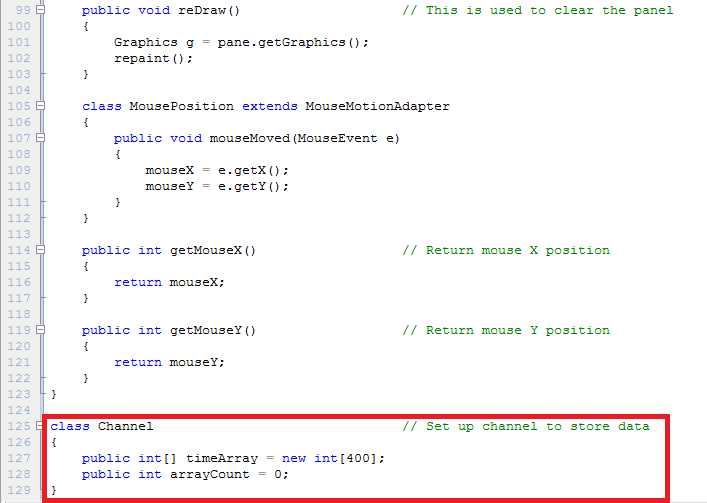

Like I said before, the program originally want to get external data. Now, we just try to acquire mouse position, so I need to return the position to the main class.

In the main class, we need to (1) construct a frame, (2) set up channels, and (3) draw the graphs. Pretty easy, right!!

星期日, 2月 20, 2011

LG gt540 Blue error handler rescue --> success

Last night, I tried to upgrade my LG gt540 to android 2.2 and it worked. However, there is a little problem about the wifi, so I decided to reflash the ROM. Unfortunately, it showed the message of blue error handler. Even I tried another ROM, sometimes it would stuck in the opening screen keeping show "ANDROID". But now I solved the problem. Here is my solution. 


1.  Download the B2CAppSetup from LG website. (We need this program to install the drivers of LG gt540)


2. You have to prepare the KDZ_FW_UPD_EN program to flash the ROM. You can download from here


3. Prepare ROM: I have tried many, finally the v20a_00france.kdz was successfully flashed. You can download from here.


4. Then use KDZ_FW_UPD_EN to flash the ROM. You have to let your phone enter the download mode (volume down + Power)


5. After flashing the ROM, the phone may stuck in showing "ANDROID". If so, then use KDZ_FW_UPD_EN flash the V20D_00FB.kdz again, because later we need to use fastboot.

6. After flashing V20D_00FB.kdz, your phone may still stuck in showing "ANDROID". Then shut it down and hold the camera button then plug the USB to let you phone into the fastboot mode. Then you can follow the instruction of upgrading LG gt540 to android 2.2.

星期日, 8月 08, 2010

EMG Signals Drive Servo


This simple project is what I really want to do before. I used Biopac system to amplify my EMG signals and acquired these signals by NI USB-6009.

##CONTINUE##
Originally, I want to use serial communication to send the control signals to arduino, but I don't know how to send the unsigned long integer in labview instead of string. As the result of that, I used USB-6009 to generate analog output to arduino.


Every hardware thing is ready, next is to write the program. As I mentioned before, I used labview to acquire EMG signals, so I just acquired the signals, calculated by RMS, and transformed the number into the range 0-5 to have the USB-6009 generate analog output voltage between 0 and 5.


The arduino program is also very simple. It just uses analogInput to receive the voltage from USB-6009 and controls the servo by the voltage value.


However, as you can see, the control is not good. I think this is the key point that I need to establish a good control strategy in the future.

星期六, 7月 03, 2010

Arduino + Processing


I made it to control my robotic arm originally. However, it's bad looking, so I used wii nunckuk instead.

##CONTINUE##
Yesterday, I was thinking how I can do to simply model hand motion and display in computer screen. I am not good at 3D painting, so I used RGB cube that I saw some people used it to demonstrate some programs. You can also find the processing code from the above link.

In this simple project, I used two potentiometers to control two axises. I am sorry that I don't have any idea to use the flex sensor, but I pasted it before, so I did not take it out.


Here is the code in arduino board:
int val_1;  //flex sensor
int val_2;  //middle potentiometer
int val_3;  //bottom potentiometer

void setup()
{
  Serial.begin(9600);
}

void loop()
{
  val_1=analogRead(0);
  val_2=analogRead(1);
  val_3=analogRead(2);
  
  val_2=map(val_2,340,1023,0,360);
  val_3=map(val_3,0,1023,640,0);
  
  To2bytes(val_2);
  To2bytes(val_3);
  
  /*
  Serial.print(val_1);
  Serial.print("\t");
  Serial.print(val_2);
  Serial.print("\t");
  Serial.println(val_3);
  */
  delay(200);
}

void To2bytes(unsigned int inX){
  byte H_Byte;
  byte L_Byte;
 // int a=B01111111
  H_Byte=inX>>8;  
  L_Byte=(inX%256);
  Serial.print(H_Byte,BYTE);
  Serial.print(L_Byte,BYTE);
}

And I only add some codes in RGB cube code.
In void setup

println(Serial.list());// List all the available serial ports
  myPort = new Serial(this, Serial.list()[1], 9600); 
  
  //You have to import serial class before.
  //import processing.serial.*;
  //Serial myPort;  // The serial port

In void draw()

int[] inByte = new int[4];
  while (myPort.available() == 4) {  
    inByte[0]= myPort.read();
    inByte[1]= myPort.read();
    inByte[2]= myPort.read();
    inByte[3]= myPort.read();
    inY=(inByte[0]<<8)+inByte[1];
    inX=(inByte[2]<<8)+inByte[3];
     print("X" +inX);
     print("\t");
     println("Y" +inY);
  }